How Desk Ergonomics Transform Your Posture and Productivity During Long Work Sessions
Chris Martinez
03/24/2026
5 min read
Poor desk ergonomics create a cascade of physical problems that directly undermine your ability to maintain focus and energy throughout extended work periods. Your workspace setup affects everything from spinal alignment to circulation, influencing both immediate comfort and long-term health outcomes.
When your desk, chair, and monitor aren't properly aligned with your body mechanics, you compensate through subtle postural adjustments that compound over hours. These micro-adaptations lead to muscle tension, reduced blood flow, and cognitive fatigue that makes sustained concentration increasingly difficult.
Position Your Monitor at Eye Level
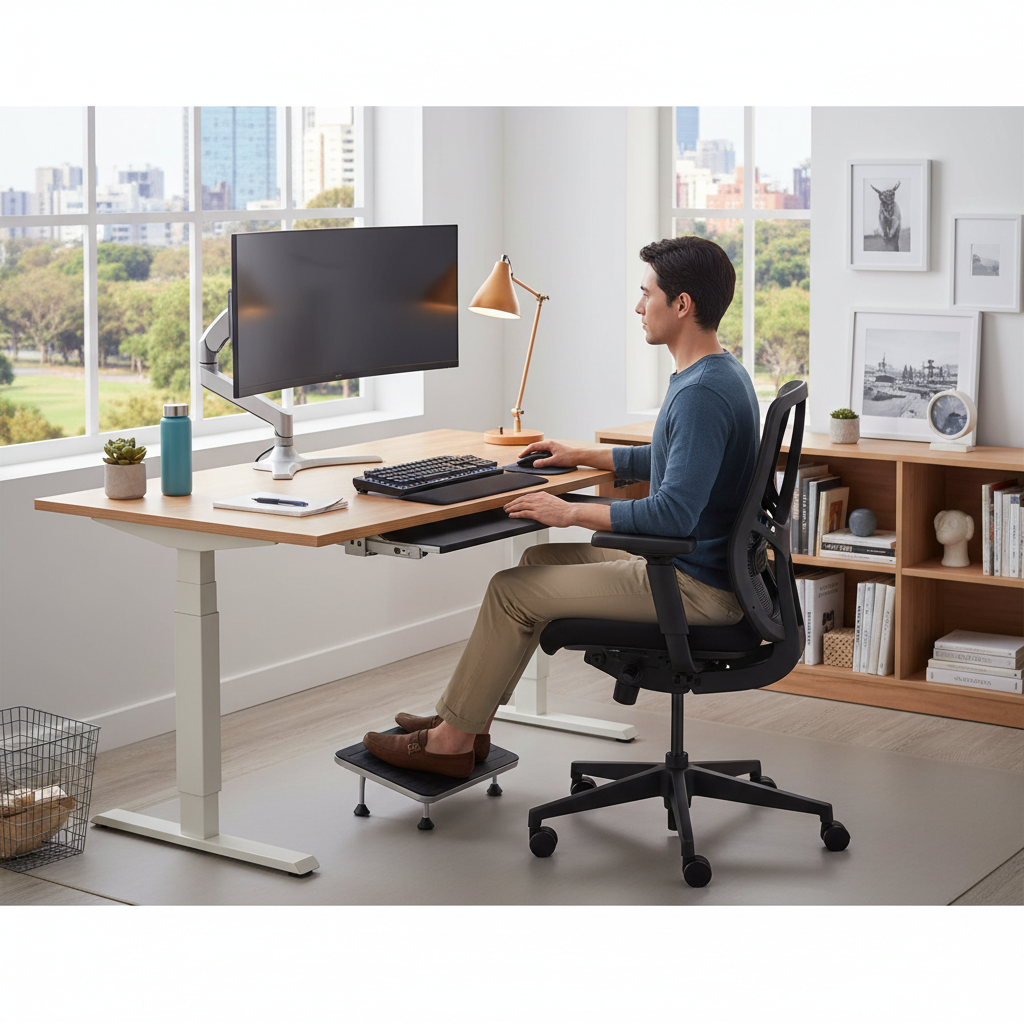
Your monitor should sit approximately arm's length away with the top of the screen at or slightly below eye level. This positioning prevents forward head posture, which strains cervical vertebrae and creates tension headaches that derail productivity. Many people place laptops directly on their desk, forcing them to look downward for hours.
Consider using a laptop stand or external monitor to achieve proper height. The Dell UltraSharp series and LG UltraWide monitors offer adjustable stands that make positioning easier. When you maintain neutral neck alignment, you reduce strain on supporting muscles and preserve the energy typically wasted on postural compensation.
Set Your Chair Height for 90-Degree Angles
Adjust your chair so your feet rest flat on the floor with your knees and elbows forming approximately 90-degree angles. This configuration distributes weight evenly across your thighs and maintains proper lumbar curve. Your shoulders should remain relaxed, not hunched upward to reach your keyboard.
The Herman Miller Aeron and Steelcase Leap chairs provide extensive adjustability for achieving these angles. If your current chair lacks proper support, a lumbar cushion can help maintain the natural curve of your lower back. Proper chair height prevents the hip flexor tightness that contributes to lower back pain during long work sessions.
Keep Your Keyboard and Mouse at Elbow Height
Your keyboard should sit at the same height as your elbows when your arms hang naturally at your sides. This positioning prevents wrist extension, which compresses the median nerve and can lead to carpal tunnel syndrome. Your wrists should remain straight, not bent upward or downward while typing.
Keyboard trays can help achieve proper height when your desk is too high. The Humanscale M/Connect and 3M Adjustable Keyboard Tray offer smooth adjustment mechanisms. Position your mouse at the same level as your keyboard to avoid reaching or twisting motions that create shoulder tension throughout the day.
Support Your Lower Back's Natural Curve
Your chair should maintain the natural inward curve of your lower back, preventing the slouched posture that leads to disc compression and muscle fatigue. This lumbar support reduces pressure on spinal discs and helps maintain proper alignment throughout your entire spine.
If your chair lacks adequate lumbar support, place a small pillow or rolled towel behind your lower back. The Steelcase Think chair and Herman Miller Embody provide excellent built-in lumbar support systems. Proper lower back support prevents the gradual forward slouch that develops during extended sitting periods.
Position Frequently Used Items Within Easy Reach
Arrange your workspace so essential items like your phone, notebook, and water bottle sit within arm's reach without requiring you to stretch or twist. These seemingly minor movements accumulate throughout the day, creating muscle imbalances and interrupting your work flow.
Create zones around your workstation based on frequency of use. Keep daily essentials within the primary reach zone directly in front of you and slightly to each side. Secondary items can occupy the extended reach zone that requires minimal leaning. This organization reduces repetitive stress and helps maintain proper posture throughout your work session.
Take Regular Movement Breaks Every 30 Minutes
Setting a timer for 30-minute intervals reminds you to stand, stretch, or walk briefly, counteracting the physiological effects of prolonged sitting. These micro-breaks restore circulation, reset your posture, and provide mental refreshment that sustains focus over longer periods.
Use apps like Stretchly or Time Out to automate break reminders. Simple movements like shoulder rolls, neck stretches, or walking to get water help prevent the muscle stiffness and mental fog that develop during extended sitting. Regular movement breaks can actually increase total productivity by maintaining higher energy levels throughout your work session.
Adjust Your Screen Brightness and Contrast
Match your screen brightness to the ambient lighting in your room to reduce eye strain that leads to forward head posture as you unconsciously lean closer to see better. Proper contrast ratios prevent the squinting and tension that contribute to headaches and decreased concentration.
Use your computer's built-in brightness controls or apps like f.lux to automatically adjust screen settings throughout the day. Position your monitor perpendicular to windows to minimize glare. When your eyes remain comfortable, you naturally maintain better posture and experience less fatigue during extended computer work.
Create Adequate Leg Room Beneath Your Desk
Ensure sufficient space under your desk to extend your legs comfortably and change positions throughout the day. Cramped leg positioning restricts circulation and forces awkward postures that contribute to hip tightness and lower back discomfort.
Remove unnecessary items from under your desk area and consider using a footrest if your legs don't reach the floor comfortably after adjusting chair height. The Humanscale FR300 footrest provides adjustable height and angle options. Adequate leg room allows for the subtle position changes that prevent stiffness and maintain circulation during long work sessions.
Proper desk ergonomics create a foundation for sustained productivity by supporting your body's natural alignment and reducing the physical stress that accumulates during extended work periods. Small adjustments to your workspace setup can produce significant improvements in both comfort and focus, making long work sessions more sustainable and effective.