How Proper Desk Setup Transforms Your Energy and Focus During Long Work Sessions
Chris Martinez
03/24/2026
5 min read
Poor desk ergonomics create a cascade of physical strain that directly undermines mental performance, productivity, and overall well-being during extended work periods. Your workspace setup influences everything from spinal alignment to blood circulation, affecting how alert and focused you remain throughout the day.
Most workers experience the effects of suboptimal desk arrangements within hours: neck tension, shoulder stiffness, lower back pain, and declining concentration. These symptoms aren't just uncomfortable distractions—they're signals that your body is working harder than necessary to maintain basic functions. When your musculoskeletal system is under constant strain, it diverts energy away from cognitive tasks and creative thinking.
Position Your Monitor at Eye Level to Prevent Forward Head Posture
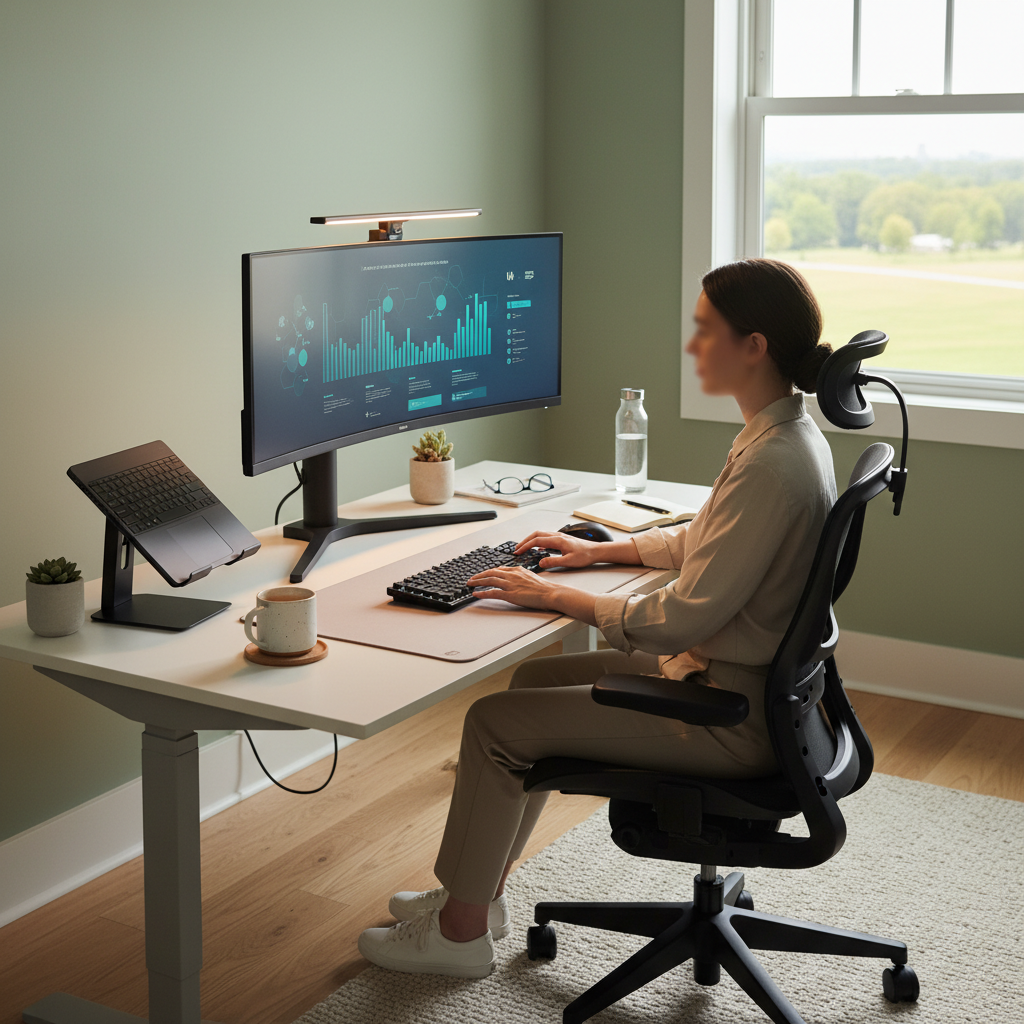
Your monitor height directly affects neck alignment and prevents the forward head posture that plagues desk workers. The top of your screen should align with your eye level when sitting upright, allowing you to view content without tilting your head up or down. Companies like Dell and LG offer adjustable monitor stands, while laptop users benefit from external keyboards paired with laptop stands. This simple adjustment reduces cervical spine compression and maintains the natural curve of your neck. Forward head posture forces neck muscles to work overtime, creating tension that radiates into shoulders and upper back.
Adjust Chair Height So Feet Rest Flat on the Floor
Proper chair height establishes the foundation for good posture and healthy circulation throughout long work sessions. Your thighs should be parallel to the floor with feet resting flat, creating 90-degree angles at your hips and knees. Herman Miller and Steelcase chairs offer precise height adjustments, but even basic office chairs can work with proper setup. When chair height is correct, pressure distributes evenly across your thighs rather than concentrating behind your knees. Poor circulation from improper leg positioning leads to numbness, restlessness, and decreased focus as your body signals discomfort.
Keep Keyboard and Mouse at Elbow Height
Arm positioning affects shoulder tension and wrist health during repetitive typing and clicking motions. Your elbows should bend at approximately 90 degrees with arms hanging naturally at your sides when reaching for keyboard and mouse. Adjustable keyboard trays from companies like Humanscale allow fine-tuning of height and angle. This positioning prevents your shoulders from hiking up or arms from reaching forward, both of which create muscle fatigue. Proper arm alignment also maintains neutral wrist position, reducing strain on tendons and nerves that can lead to repetitive stress injuries over time.
Support Your Lower Back With Proper Lumbar Positioning
Lumbar support maintains the natural inward curve of your lower spine, preventing the slouched posture that causes back pain and energy drain. Your chair's backrest should contact your lower back just above belt level, providing gentle forward pressure that supports spinal alignment. Many chairs include adjustable lumbar mechanisms, while portable cushions offer solutions for fixed seating. Proper lumbar support allows your core muscles to relax rather than constantly working to prevent slouching. When your spine maintains its natural curves, breathing becomes more efficient and energy levels remain stable throughout extended sitting periods.
Position Frequently Used Items Within Easy Arm's Reach
Organizing your workspace to minimize reaching and twisting prevents muscle strain and maintains focus on tasks rather than physical discomfort. Items you use multiple times per hour—phone, documents, water bottle—should sit within the natural sweep of your arms without leaning or stretching. This includes positioning your mouse close to your keyboard rather than far to the right, which forces shoulder rotation. Desktop organizers from brands like Steelcase help create efficient layouts. Excessive reaching breaks postural alignment and creates muscle imbalances that accumulate over hours of work.
Take Movement Breaks Every 30-45 Minutes
Regular movement breaks reset your posture, restore circulation, and refresh mental focus more effectively than coffee or other stimulants. Standing and moving for just two to three minutes every half hour counteracts the physiological effects of prolonged sitting. Set phone reminders or use apps like Stand Up! to prompt regular breaks. Simple movements like shoulder rolls, gentle neck stretches, or walking to get water activate different muscle groups and promote blood flow. These brief interruptions actually enhance productivity by preventing the physical discomfort and mental fatigue that build throughout static work sessions.
Optimize Lighting to Reduce Eye Strain and Neck Tension
Proper lighting reduces the unconscious postural adjustments your body makes to improve vision, such as leaning forward or tilting your head. Your workspace should have ambient lighting that matches your screen brightness, preventing stark contrasts that cause eye strain. Position light sources to avoid glare on your monitor—typically behind or to the side of your screen. Task lighting like desk lamps from Philips or BenQ provides focused illumination for document work without creating screen reflections. When lighting is inadequate, you naturally adjust your posture to see better, often without realizing these micro-movements are creating cumulative strain.
Create Adequate Legroom to Prevent Circulation Issues
Sufficient space under your desk allows natural leg positioning and prevents the circulation problems that lead to restlessness and difficulty concentrating. Your knees shouldn't touch the underside of your desk, and you should be able to cross your legs occasionally without restriction. Clear away storage boxes, CPU towers, or other obstacles that force awkward leg positions. Cramped legroom forces you to angle your legs in ways that compress blood vessels and create pressure points. Good circulation supports sustained mental energy and prevents the fidgeting that breaks concentration during detailed work.
Proper ergonomics creates a foundation for sustained productivity by removing physical barriers to mental performance. As remote and hybrid work arrangements continue evolving, investing in workspace setup becomes increasingly valuable for long-term health and professional effectiveness.